
Retro Circle for ssLauncher OR1.0 - Google Play
You'll be able to see results in few seconds.
Publisher Description
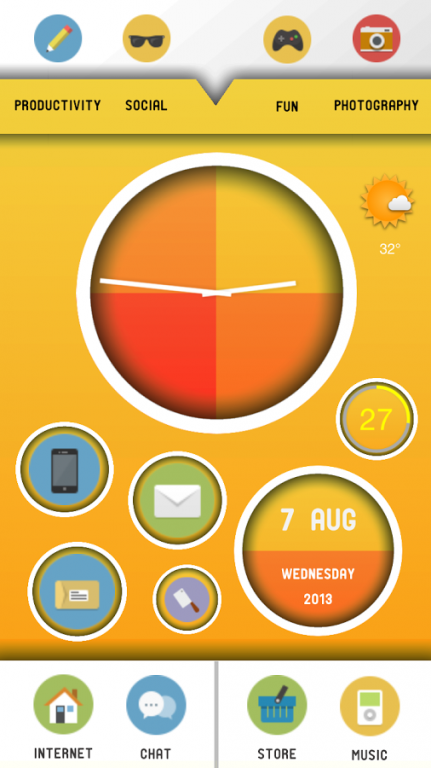
THE RETRO CIRCLE THEME FOR SSLAUNCHER ORIGINAL
ATTENTION : If you have PROBLEM / ISSUE with this theme, please EMAIL me at tolya.andre@gmail.com.
SEE INSTALLATION STEPS BELOW :
Tested on Samsung Galaxy Note 2
--------- INSTALLATION STEPS :
1. Install ssLauncher Original :
The Retro Circle Theme is a theme for ssLauncher Original. The ssLauncher Original is a paid app by other developer (CHYK), not me. So before everything, you must have the ssLauncher Original installed first on your device. If you have not, go to https://play.google.com/store/apps/details?id=com.ss.launcher.to and install it.
2. Install The Retro Circle Theme
Only after ssLauncher Original installed, you can install The Retro Circle Theme. (Download from Google Play Store).
3. Launch ssLauncher Original :
Launch ssLauncher Original on your device and go to Menu by pressing your device menu button, choose "Theme", then "Apply Theme Package". Then choose the Retro Circle Theme. You will be prompted to clear Fonts & Images, choose"Yes".
4. Make new pages :
After applying the theme, please provide 6 new pages first.
To make new pages, go to Menu by pressing your device menu button and scroll down and tap + button
Choose Cover Page and make 5 new pages : Home, Productivity, Social, Fun, Photography.
Repeat the process to make 1 new page, but this time are Application Drawer page : Applications.
After all pages are made, change their wallpapers as you like, there are 4 different retro colors (Portrait and Landscape) you can have fun with them :). - go to Menu by pressing your device menu button - scroll down - tap the icon above the pencil icon - select the desired wallpapers as per their orientation. Also Check the Additional Styles for preset icons and images. - Press and Hold the shortcut and tap Edit - Styles - Additional.
You have total 8 pages now.
5. Apply a layout in a page :
– Long press the free area of the page.
– Select Load Template
– Select Cover Page
– Set layouts to match the pages :
Template 1 ----to---- Home
Template 2 ----to---- Productivity
Template 3 ----to---- Social
Template 4 ----to---- Fun
Template 5 ----to---- Photography
- If you're asked to fit layout to page width, choose "yes". It's because Android devices vary in so many screen sizes.
6. Tap the widgets to load them automatically. If this way does not work, try to install them manually from Google Play Store :
Weather widget : Eye in The Sky Tim Clark
Clock : Jelly Bean Clock Widget by AIM7
Circle Battery Widget : Cedric Depoortere
7. Lock the screen after all to avoid accidental layout setting :
Go to Menu by pressing your device menu button and tap the lock symbol on the left bottom.
DONE
If you still find this not clear, you may want to check the ssLauncher Original official site. They also provide the general tutorial there.
http://chyk-ss.blogspot.kr/
--------------------
(Please be advised that the widgets on screenshots belong to their respective developers. Not me. You may have to download and install them separately from Google Play Store and refer all widgets settings respectively)
If you have any suggestion and critics, please email me at :
tolya.andre@gmail.com
(Thanks to ChYK - ssLauncher Developer)
About Retro Circle for ssLauncher OR
The company that develops Retro Circle for ssLauncher OR is TraktoR6666. The latest version released by its developer is 1.0.
To install Retro Circle for ssLauncher OR on your Android device, just click the green Continue To App button above to start the installation process. The app is listed on our website since 2013-08-07 and was downloaded 0 times. We have already checked if the download link is safe, however for your own protection we recommend that you scan the downloaded app with your antivirus. Your antivirus may detect the Retro Circle for ssLauncher OR as malware as malware if the download link to com.ss.launcher.theme.retrocircle is broken.
How to install Retro Circle for ssLauncher OR on your Android device:
- Click on the Continue To App button on our website. This will redirect you to Google Play.
- Once the Retro Circle for ssLauncher OR is shown in the Google Play listing of your Android device, you can start its download and installation. Tap on the Install button located below the search bar and to the right of the app icon.
- A pop-up window with the permissions required by Retro Circle for ssLauncher OR will be shown. Click on Accept to continue the process.
- Retro Circle for ssLauncher OR will be downloaded onto your device, displaying a progress. Once the download completes, the installation will start and you'll get a notification after the installation is finished.
Program Details
System requirements
Download information
Pricing
Version History
version 1.0
posted on 2013-08-07
Disclaimer
Official Google Play Link
We do not host Retro Circle for ssLauncher OR on our servers. We did not scan it for viruses, adware, spyware or other type of malware. This app is hosted by Google and passed their terms and conditions to be listed there. We recommend caution when installing it.
The Google Play link for Retro Circle for ssLauncher OR is provided to you by apps112.com without any warranties, representations or guarantees of any kind, so access it at your own risk.
If you have questions regarding this particular app contact the publisher directly. For questions about the functionalities of apps112.com contact us.
